ShopDreamUp AI ArtDreamUp
Deviation Actions
Daily Deviation
Daily Deviation
April 13, 2009
" I like this because it's in so much detail, well set out, easy to follow and it's really a fantastic idea for the site, so I think more exposure would do it some good. "
Journal CSS Suggestions by =VisualFour
Journal CSS Suggestions by =VisualFour
Featured by PurpelBlur
Suggested by DCZed


Suggested Deviants


Suggested Collections


You Might Like…


Featured in Groups


Description
Please read before posting, Everything is explained in detail below.
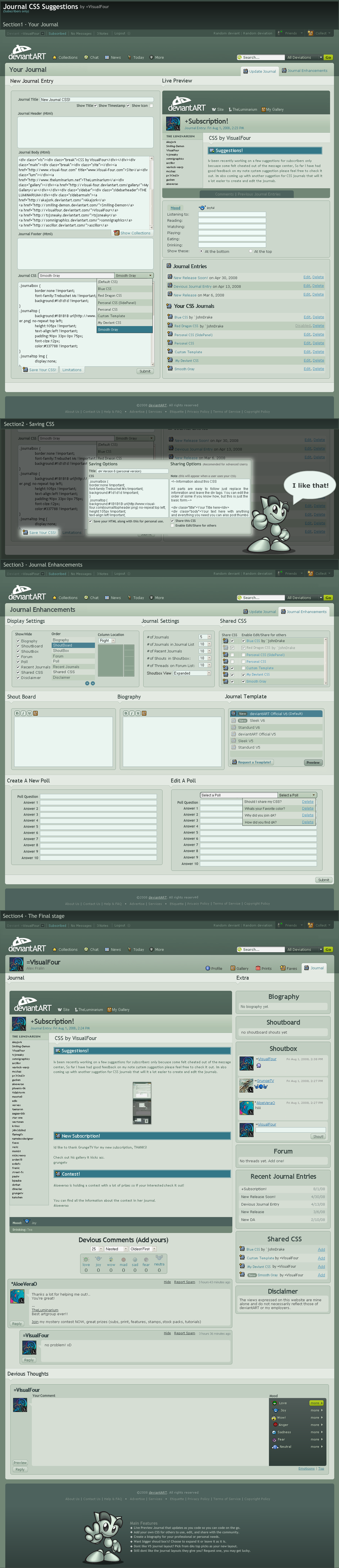
Stage 1 - Your Journal
•New Journal Entry
This is a lot like the current one but now you can choose to show/hide the title, time stamp, or the journal icon, You can also see the options to save your CSS and select any CSS templates you have already created.
•Live Preview
This feature would prove vary handy for those who dont know of this. [link]
But also because you can code here with all the parts you need and you dont have to worry about anything being messed up if your an amateur.
•Mood
This hasn't changed, aside from moving it outside the edit area and changing some colors.
•Journal Entrys
This is also already on the page.
•Your CSS Templates
here you can see that their is the option to Edit and Delete a saved CSS template, The edit option opens up the save options for that CSS, and delete obviously deletes it.
note: You can also see that the one that is disabled is an example of how a none editable CSS template will show up.
It also has the original creators name.
Stage 2 - Saving Options
This feature will allow you to save your CSS in a template form, You can choose to save the HTML that you had with it or leave it out.
If you choose to share your CSS with anyone else, you can add a note that will give instructions on how to use and code the html part of the journal.
You can also choose to allow them to share and edit the css with other people from their journal. Or you can choose to make it yours only and share it only from your journal, If you choose that option then only you get credit and they will not be able to edit, see, or share the CSS.
If you dont want to share your CSS at all just simple leave those fields blank and unchecked, However, if you would like to share it later and have the instructions ready then you can save the instructions with in that template.
Stage 3 - Journal Enhancements
•Display Settings
The only thing new here is the amount of options and the why it looks.
•Journal Settings
Here you can see that the setting are as they are now, With an additional setting on shout box's, If you notice in "Section4" the shot box's are larger. Thats because I have Expanded chosen. Only two options though dont see the need for medium view.
•Shared CSS
Though you can choose to set this in "section1" This feature allows you to edit all your sharing options in one shot.
Note: the one grayed out has been disabled by the original coder.
•Shout Board
This is vary basic, you type in the box what you want to show up, Though I added the feature to give Bold, Italic, or Underline, and even an image link.
•Biography
This has the same concept as the Shout Board but is for your biography, This feature is currently not available.
•Journal Template
Don't get this mixed up with the saving Journals, This is the PAGE template and not the Journal its self, This feature can only be changed with the templates that the admins give you, However I figured why not give an option to request one.
•Create a Poll
Nothing new here
•Edit a Poll
The only new thing here is the option to delete a poll and the new drop down menu.
Stage 4 - The Last Stage
*Ok ill just point out the new things here.
•Deviant Template V6
Basically the way the whole thing looks is different, That would be the template options in "Stage 3".
•Biography
This is a new box that allows you to have a small biography about yourself.
•Shout Box
Only thing new here is the expanded view of the shouts.
•Shared CSS
This is where you can add CSS that the user offers to you.
•Devious Thoughts
This just has a new look basically, no new features.
Stage 1 - Your Journal
•New Journal Entry
This is a lot like the current one but now you can choose to show/hide the title, time stamp, or the journal icon, You can also see the options to save your CSS and select any CSS templates you have already created.
•Live Preview
This feature would prove vary handy for those who dont know of this. [link]
But also because you can code here with all the parts you need and you dont have to worry about anything being messed up if your an amateur.
•Mood
This hasn't changed, aside from moving it outside the edit area and changing some colors.
•Journal Entrys
This is also already on the page.
•Your CSS Templates
here you can see that their is the option to Edit and Delete a saved CSS template, The edit option opens up the save options for that CSS, and delete obviously deletes it.
note: You can also see that the one that is disabled is an example of how a none editable CSS template will show up.
It also has the original creators name.
Stage 2 - Saving Options
This feature will allow you to save your CSS in a template form, You can choose to save the HTML that you had with it or leave it out.
If you choose to share your CSS with anyone else, you can add a note that will give instructions on how to use and code the html part of the journal.
You can also choose to allow them to share and edit the css with other people from their journal. Or you can choose to make it yours only and share it only from your journal, If you choose that option then only you get credit and they will not be able to edit, see, or share the CSS.
If you dont want to share your CSS at all just simple leave those fields blank and unchecked, However, if you would like to share it later and have the instructions ready then you can save the instructions with in that template.
Stage 3 - Journal Enhancements
•Display Settings
The only thing new here is the amount of options and the why it looks.
•Journal Settings
Here you can see that the setting are as they are now, With an additional setting on shout box's, If you notice in "Section4" the shot box's are larger. Thats because I have Expanded chosen. Only two options though dont see the need for medium view.
•Shared CSS
Though you can choose to set this in "section1" This feature allows you to edit all your sharing options in one shot.
Note: the one grayed out has been disabled by the original coder.
•Shout Board
This is vary basic, you type in the box what you want to show up, Though I added the feature to give Bold, Italic, or Underline, and even an image link.
•Biography
This has the same concept as the Shout Board but is for your biography, This feature is currently not available.
•Journal Template
Don't get this mixed up with the saving Journals, This is the PAGE template and not the Journal its self, This feature can only be changed with the templates that the admins give you, However I figured why not give an option to request one.
•Create a Poll
Nothing new here
•Edit a Poll
The only new thing here is the option to delete a poll and the new drop down menu.
Stage 4 - The Last Stage
*Ok ill just point out the new things here.
•Deviant Template V6
Basically the way the whole thing looks is different, That would be the template options in "Stage 3".
•Biography
This is a new box that allows you to have a small biography about yourself.
•Shout Box
Only thing new here is the expanded view of the shouts.
•Shared CSS
This is where you can add CSS that the user offers to you.
•Devious Thoughts
This just has a new look basically, no new features.
Image size
1214x5607px 721.73 KB
© 2008 - 2024 VisualFour
Comments63
Join the community to add your comment. Already a deviant? Log In

OMG yes PLEASE I'm so bad at figuring out journals!